
 PocketMine-MP
Opening ports in your firewall
If you have a firewall set up, you need to allow access to UDP port 19132 (for IPv4) and/or 19133 (for IPv6).
Windows
Note
You’ll probably need the admin for your computer to make changes to the firewall settings.
Usually, on first server startup on Windows, a dialog like this will pop up.
Click “Allow access” to allow PocketMine-MP through the firewall and allow players to connect.
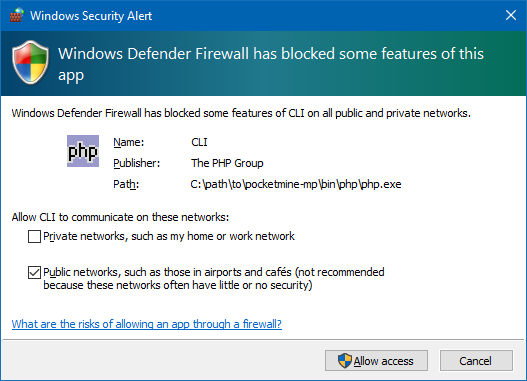
If you didn’t get the dialog or you clicked “Cancel”, you can do the following instead:
Search for “firewall” in the Start Menu and select “Allow an app through Windows Firewall”.
Click “Change settings” in the top right (you might be asked for an admin login).
Scroll down the list until you find “php.exe”.
If you’re on a private network (typical for a home WiFi or LAN), tick the “private” box.
If you’re on a public network, you can tick the “public” box, but be aware that other people might be able to join your server on untrusted networks (e.g. if you’re connected to public WiFi).
Click “OK” at the bottom when you’re done.
Ubuntu (or other Linux distros with ufw)
Note
You’ll need sudo for this.
There are many different flavours of Linux, and we can’t cover them all here. However, you’ll usually find ufw on Linux machines.
First, check if ufw is enabled by running sudo ufw status. If it says “Status: inactive”, you don’t need to do anything else.
If it’s active, do sudo ufw allow 19132/udp (for IPv4) or sudo ufw allow 19133/udp (for IPv6).